The Psychology and Practicality of the Level Up Screen in Modern Design
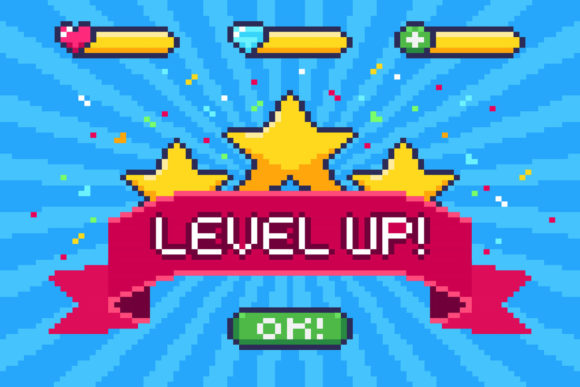
The Level Up Screen is more than a nostalgic pixelated flash from an 8-bit arcade game. It is a powerful psychological and visual tool, a universal symbol of progress, achievement, and reward. Today, creators, marketers, educators, and business professionals are increasingly interested in leveraging this iconic UI element—not just for games, but for apps, learning platforms, marketing campaigns, and product interfaces. The core appeal is simple: it provides immediate, gratifying feedback that motivates continued engagement. However, using a Level Up Screen effectively requires moving beyond superficial pixelation and understanding its deeper function.
Common Mistakes When Integrating a Level Up Screen
The biggest mistake is treating the Level Up Screen as mere decoration. Slapping a generic, poorly-integrated trophy graphic onto a profile page doesn’t create the intended motivational effect. It becomes visual clutter. Another frequent oversight is ignoring context. The aesthetic of an achievement screen for a serious corporate training module should differ vastly from one in a casual mobile hobby app. Using a jarring, overly-gamey 8-bit style in a professional environment can undermine credibility rather than enhance it.
People also often overlook scalability and technical quality. Downloading a single, low-resolution JPEG file and trying to repurpose it for multiple uses leads to blurred, pixelated assets that degrade your project’s visual quality. This is where the product specification of a high-resolution 6000x4500 pixel JPEG and vector elements becomes critical. If you need to separate elements, edit text, or adjust colors, you must work with the vector source in an editor like Adobe Illustrator. Attempting edits on the raster JPEG will permanently damage the asset’s quality.
Misunderstanding the User’s Journey
A Level Up Screen should mark a meaningful milestone. A common error is triggering it for trivial actions, diluting its significance. If a user “levels up” for simply logging in three times, the reward feels hollow and the mechanic quickly becomes annoying. Conversely, making the progression too obscure or difficult frustrates users. The balance between challenge and achievability is key. The screen’s presentation must clearly communicate what was accomplished and why it matters, using concise text alongside the visual iconography.
How These Errors Impact Your Results
Poor implementation directly affects user satisfaction and retention. A poorly-timed or visually unappealing achievement notification can break immersion in an app, making the experience feel cheap or manipulative. For entrepreneurs and marketers using these screens in loyalty programs or email campaigns, a low-quality, pixelated graphic damages brand perception, suggesting a lack of professionalism. From a practical efficiency standpoint, not having editable vector files creates a bottleneck. Every design adjustment requires finding a new asset or hiring a designer, increasing cost and slowing down iteration.
Furthermore, using a one-size-fits-all Level Up Screen across different audience segments fails to communicate effectively. The triumphant fanfare of an arcade-style trophy might energize a hobbyist community but confuse or alienate adult learners in an online course. The result is a disconnect where the intended positive reinforcement instead causes confusion or disengagement.
Practical Advice for Effective Use
First, define the “level” clearly. What specific skill, task, or milestone does this represent? Align the visual style—be it minimalist vector illustration, retro pixels, or modern flat design—with your brand and audience. Use the high-quality source files intelligently. With a vector-based illustration, you can effortlessly adapt colors to match your theme, remove extraneous elements, or scale the graphic for any use from a web badge to a printed certificate, all without loss of quality.
Integrate the screen logically into the user flow. It should appear at a natural breakpoint, after a genuine accomplishment. Follow the screen with a clear path forward, hinting at the next achievable goal to maintain momentum. For example, after a user completes a beginner module in your educational software, the Level Up Screen could congratulate them and subtly preview the topic of the intermediate module.
What to Check Before You Commit
Before purchasing or applying a Level Up Screen asset, verify its technical flexibility. Ensure you receive both the high-resolution raster file for immediate use and, crucially, the editable vector source files (like AI or EPS). Check the licensing to confirm you can use it for your intended commercial or personal projects. Assess the art style’s versatility: can its colors and components be easily modified to fit your existing design scheme?
Finally, prototype its placement. Mock up where and how the screen will appear in your interface. Test the timing and copy that will accompany it. Is the message celebratory but not childish? Does it feel like a genuine reward? This small step can prevent a jarring user experience and ensure the asset serves its purpose as a tool for positive reinforcement.
A Better Approach: Thoughtful Customization
The best use of a Level Up Screen comes from thoughtful customization. Start with a high-quality base asset, like the described vector illustration, and tailor it. For a professional audience, you might strip away the overt arcade game pixels, simplify the trophy icon, and use a mature color palette. For a retro gaming blog, you might amplify the 8-bit UI elements and add subtle animation. The goal is to make the moment of achievement feel authentic to your platform and resonant for your user.
Remember, the underlying principle is feedback and motivation. Whether it’s a pixelated gaming trophy for a community challenge or a sleek vector badge for a completed business course, the Level Up Screen is a visual shorthand for growth. By avoiding the common pitfalls of poor integration, inappropriate style, and low-quality assets, and by focusing on meaningful milestones and technical adaptability, you can harness this powerful symbol to genuinely level up your user’s experience.