Live Streaming Tool Doodle Design: A Customizable Graphics Solution
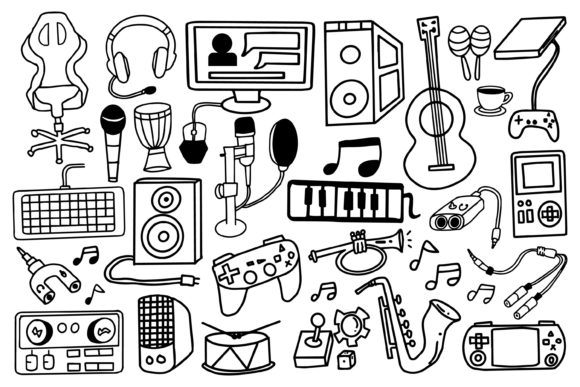
In the competitive landscape of online gaming and music live streaming, visual branding is a crucial element for channel identity and audience engagement. A Live Streaming Tool Doodle Design refers to a collection of graphics—such as overlays, alerts, frames, and icons—created in a playful, hand-drawn doodle style. These designs are typically offered as fully editable vector files in formats like AI and EPS, alongside raster formats like JPG for immediate use. The core promise of such a product is its simplicity and high customizability, allowing streamers to adjust colors, resize elements, and modify components to fit their specific streaming needs without requiring advanced design skills.
Why Consider a Doodle Style Design Toolkit?
Streamers and content creators might explore a Live Streaming Tool Doodle Design for several practical reasons. Primarily, it offers a path to a unique visual aesthetic. The doodle style often conveys approachability, creativity, and fun, which can resonate strongly with communities in gaming and music streaming. For individuals without the budget to hire a graphic designer or the time to learn complex design software, a pre-made but editable kit provides a foundational template. It enables a degree of personalization that standard, non-editable overlay packs do not, moving beyond a generic look while avoiding the steep learning curve of creating assets from scratch.
Another key reason is the technical flexibility provided by vector file formats. The inclusion of AI and EPS files means the graphics are resolution-independent. They can be scaled to any size—from a small alert icon to a full-screen overlay for different broadcast resolutions—without losing quality or becoming pixelated. This is a significant advantage for streamers who may broadcast on multiple platforms or upgrade their display setup.
Benefits and Practical Tradeoffs
The advertised benefits of a highly customizable Live Streaming Tool Doodle Design are clear. The ease of changing colors to match a channel's color scheme and adjusting elements to fit various scene layouts within streaming software (like OBS Studio or Streamlabs) can save considerable time. The editable nature also allows for long-term use; as a channel evolves, the graphics can be tweaked rather than entirely replaced.
However, there are important tradeoffs and considerations. First, "fully editable" assumes the user has access to and a basic understanding of vector editing software, such as Adobe Illustrator or free alternatives like Inkscape. Without this, the primary usable files might only be the pre-made JPGs, limiting customization. Second, while the doodle style is distinctive, it may not suit every streaming niche. More serious, professional, or minimalist channels might find the style incongruent with their content tone.
Expectations should be set realistically. These toolkits are design templates, not magic solutions. Effective integration still requires the streamer to understand their broadcasting software's compositing features. The outcome depends on how well the adjusted graphics harmonize with other channel elements like logos, fonts, and on-screen content.
Key Decision-Making Considerations
When evaluating a Live Streaming Tool Doodle Design, ask yourself specific questions about your needs and resources.
- Do you have the software and skill to edit vector files? If not, confirm the package includes high-quality, ready-use raster files (JPG/PNG) in the sizes you need.
- Does the doodle aesthetic align with your channel's personality and target audience? Review your existing branding and content style.
- What is the scope of customization needed? Determine if you only need color changes or more substantial structural modifications.
- Are the file formats provided compatible with your workflow? Ensure you can use the AI, EPS, or other included formats.
Situations Where Doodle Design Kits Are a Strong Fit
A Live Streaming Tool Doodle Design can be an excellent solution in particular scenarios. For new streamers in gaming or music who want to establish a friendly, engaging, and visually distinct channel quickly, it offers a balance of professionalism and creativity. It is also a strong fit for streamers with a consistent brand color scheme who can easily adapt the graphics through simple color edits. Channels focusing on casual gameplay, creative arts, or community-driven interactive content often benefit from the warm, informal vibe of the doodle style.
Furthermore, for creators who plan to scale their production—perhaps moving to higher resolutions or adding new scene types—the vector-based design ensures their graphics remain future-proof and adaptable without additional purchases.
When to Consider Alternatives
Despite its advantages, a doodle-style toolkit may not be the optimal choice for everyone. In situations where a streamer requires a hyper-specialized, topic-specific visual theme (e.g., a horror game channel needing dark, gritty overlays), a more tailored custom design commission might be necessary. Similarly, streamers who prefer an ultra-modern, sleek, or photorealistic aesthetic should likely explore other design styles.
If the primary requirement is simplicity with zero editing, some streamers might prefer subscription-based services that offer dynamic, automated overlays integrated directly into their streaming platform. These alternatives often require less manual asset management. Additionally, for creators proficient in graphic design, building unique assets from scratch might yield a more perfectly personalized result, though at a higher cost of time and effort.
Aligning the Tool with Your Goals
Ultimately, determining whether a Live Streaming Tool Doodle Design aligns with your goals hinges on a clear assessment of your priorities. If your goal is to achieve a customized look efficiently, with control over basic elements like color and scale, and the playful style supports your channel's image, this solution is worth serious consideration. It serves as a pragmatic middle ground between off-the-shelf graphics and full custom design.
Evaluate product offerings carefully: scrutinize the included file formats (AI, EPS, JPG), examine sample visuals to ensure the doodle quality meets your standards, and verify compatibility with your editing capabilities. By focusing on these practical aspects, you can make an informed decision that enhances your stream's visual presentation and supports your broader content creation objectives.